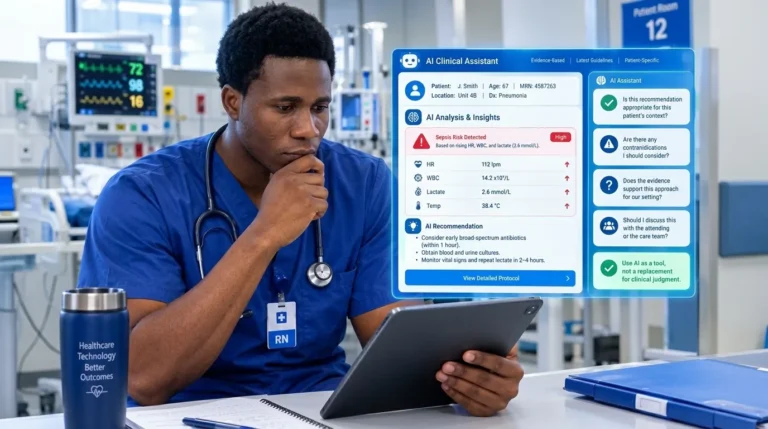

Learn how to read your Apple Watch ECG PDF like a clinical pro. Registered nurse Abdul-Muumin Wedraogo, BSN, RN, breaks down every waveform and rhythm for healthcare professionals.
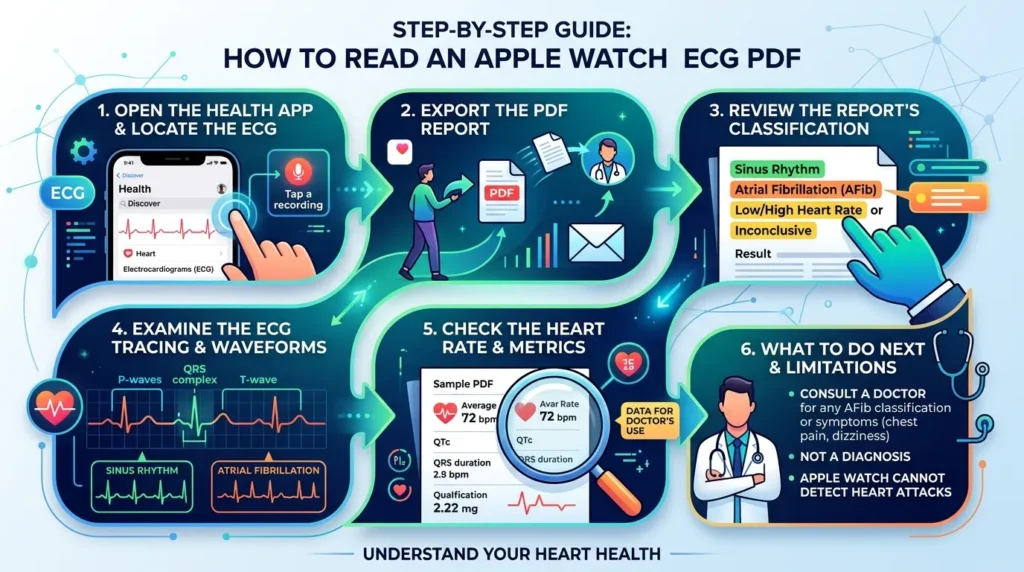
Table of Contents
📋 Affiliate Disclosure
Affiliate Disclosure: This page contains affiliate links. If you click a link and make a purchase, I may earn a small commission at no extra cost to you. As an Amazon Associate, I earn from qualifying purchases. I only recommend products I genuinely believe will benefit nurses based on my clinical experience.
Introduction: When a Wristwatch Changes Everything
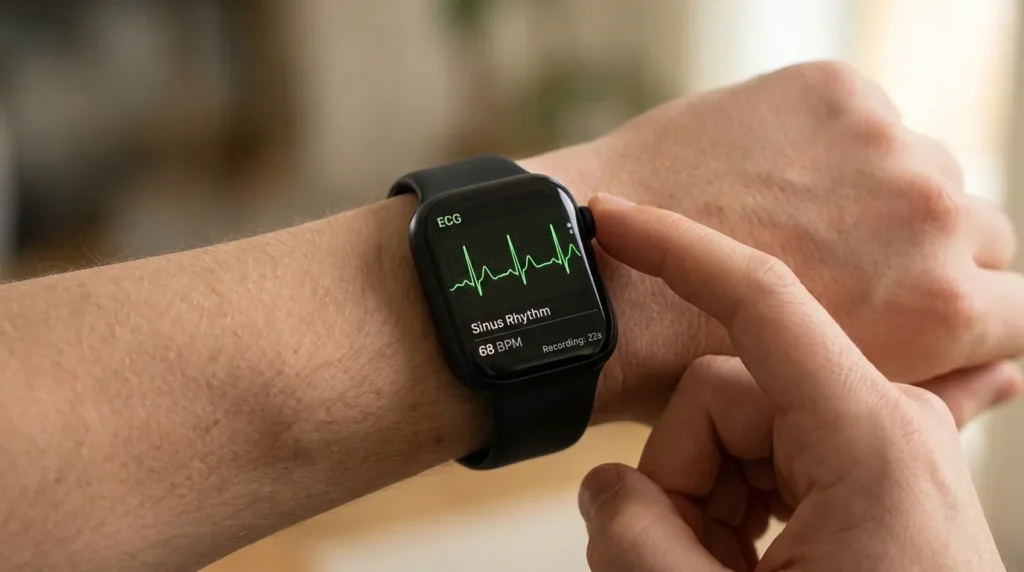
I still remember the first time a patient handed me an Apple Watch ECG PDF in the emergency room. It was a 54-year-old man who had come in reporting palpitations. Before I could even reach for the 12-lead ECG machine, he unlocked his phone and showed me a neatly formatted PDF generated right from his wrist. “My watch said something is wrong,” he told me quietly. He was right — it showed atrial fibrillation. Reading an Apple Watch ECG PDF has since become a clinical skill every healthcare professional needs to master.
Since Apple introduced the ECG app on the Apple Watch Series 4 in 2018, millions of recordings have been generated globally. By 2024, the Apple Watch ECG feature had received clearance in over 150 countries, and peer-reviewed studies have confirmed its clinical utility. Yet in hospitals and clinics across Ghana — and worldwide — many nurses, doctors, and allied health professionals still feel uncertain about what to do when a patient presents a printout from their wrist.
This guide will walk you through exactly how to read an Apple Watch ECG PDF, what every waveform means, how to interpret rhythm classifications, and when to escalate. I’ll draw on my 10+ years of clinical experience in the ER, ICU, pediatrics, and general ward to give you not just the textbook version, but the real-world clinical perspective.
By the end of this walkthrough, you will be able to: confidently interpret the Apple Watch ECG PDF layout; identify normal sinus rhythm versus concerning patterns; understand the device’s limitations; and guide patients appropriately based on their tracing.
1. What You Need to Know About Apple Watch ECG: A Clinical Perspective
Atrial fibrillation (AFib) affects more than 37 million people worldwide and is one of the leading causes of stroke. Early detection is critical, yet paroxysmal AFib — the kind that comes and goes — is notoriously difficult to capture on a standard clinic ECG, which records only 10 to 30 seconds of rhythm. Wearable ECG technology has fundamentally changed that landscape.
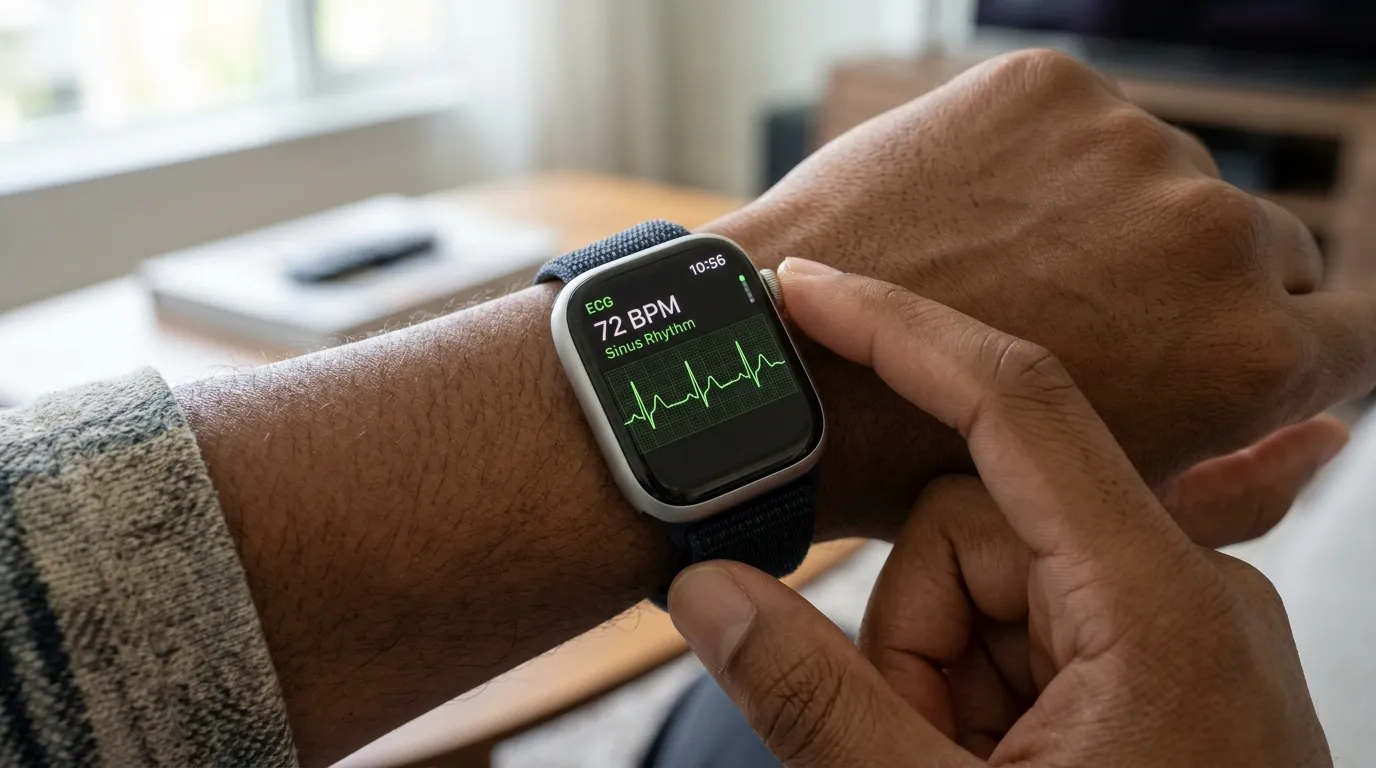
The Apple Watch Series 4 and later models include a single-lead ECG sensor embedded in the Digital Crown. When a user presses their finger on the crown, the watch records a 30-second Lead I ECG. This recording is then analyzed by an Apple-developed algorithm and classified into one of several rhythm categories. The result is stored as a PDF that users can share — and that clinicians must interpret.
The U.S. Food and Drug Administration (FDA) granted De Novo clearance to the Apple Watch ECG app in 2018, followed by clearance in Europe, and eventually in countries including Ghana through regulatory equivalence pathways. Studies published in JAMA Cardiology and The Lancet Digital Health have demonstrated sensitivity rates above 97% for AFib detection, with specificity above 99% in validated populations.
From a clinical standpoint, this matters enormously. In my years in the ER, I have seen patients who “don’t feel anything wrong” but present a watch tracing that tells a very different story. The Apple Watch ECG PDF is not a diagnostic tool in the traditional sense — it does not replace a 12-lead ECG or a Holter monitor. But it is a powerful screening instrument that, when properly interpreted, can guide triage decisions and accelerate patient care.
Healthcare professionals who understand how to read an Apple Watch ECG PDF are better positioned to validate patient concerns, correlate watch findings with clinical symptoms, and make faster, evidence-based decisions. This is not just a technology question. It is a patient safety question.
2. Understanding the Apple Watch ECG PDF Layout
Before you can read an Apple Watch ECG PDF, you need to understand what is actually in the document. The PDF is clean, formatted, and contains several distinct sections. Let me walk you through each one.
2.1 The Header Section
At the top of the Apple Watch ECG PDF, you will find basic identifying information: the date and time the recording was taken, the Apple Watch model, the user’s recorded heart rate (in beats per minute), and the classification result. This header is your first clinical stop. Always check the date and time — a recording taken during a symptomatic episode is far more clinically significant than one taken at rest with no complaints.
2.2 The Heart Rate Display
Just below the header, the PDF displays the average heart rate calculated during the 30-second recording. This is presented as a prominent number — for example, “78 BPM.” Remember: this is an average, not a rhythm assessment. A heart rate of 78 BPM could represent normal sinus rhythm, AFib with a controlled ventricular rate, or even a regularly irregular rhythm. Do not use the heart rate alone to rule in or rule out pathology.
2.3 The ECG Waveform Strip
This is the core of the Apple Watch ECG PDF. You will see a single-lead tracing, equivalent to Lead I on a standard ECG. It runs across the width of the page and represents approximately 30 seconds of electrical activity. The waveform is displayed on a standard-looking ECG grid, though the exact calibration markings differ slightly from a hospital-grade printout. The tracing is what you will analyze for rhythm, rate, P waves, QRS complexes, and T waves.
2.4 The Classification Banner
Below or near the waveform, the PDF includes a classification statement. This is generated by Apple’s algorithm. Possible classifications include: Sinus Rhythm, Atrial Fibrillation, High Heart Rate, Low Heart Rate, Inconclusive, and Poor Recording. Each of these classifications has specific clinical implications, which I cover in detail in Section 4.
2.5 The Health Note
At the bottom of the Apple Watch ECG PDF, Apple includes a standardized health note reminding the user that the recording is not a replacement for medical care and encouraging consultation with a healthcare provider. For healthcare professionals reading the PDF, this note is less relevant — but it is worth noting because patients often focus on it and may interpret it as either alarming or dismissive.
3. How to Read Each Waveform: P, QRS, and T Waves
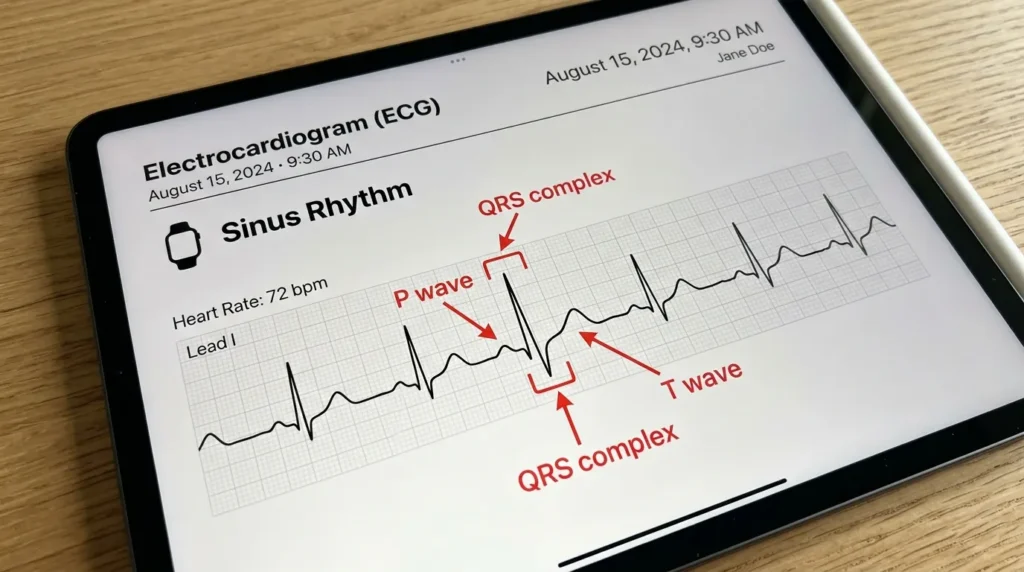
Understanding individual waveform components on an Apple Watch ECG PDF requires the same foundational knowledge you would apply to any single-lead ECG. The difference is the context: one lead, 30 seconds, taken by a patient at home.
3.1 The P Wave
The P wave represents atrial depolarization — the electrical signal that causes the atria to contract. On a normal Apple Watch ECG PDF, you should see a small, rounded upward deflection before each QRS complex. In Lead I (which is what the Apple Watch records), the P wave is typically positive.
What to look for clinically: Are P waves present? Are they consistent in shape? Is there one P wave before every QRS? If P waves are absent and the baseline appears irregularly chaotic, this is the hallmark of AFib. If P waves are present but with variable morphology, think ectopic atrial activity. In my ICU experience, patients on beta blockers or antiarrhythmics sometimes have subtly flattened P waves that are easy to miss on a single-lead strip — so take your time.
3.2 The PR Interval
The PR interval is the distance from the beginning of the P wave to the beginning of the QRS complex. It represents the time taken for the electrical impulse to travel from the atria through the AV node to the ventricles. Normal PR interval is 120–200 milliseconds (3–5 small squares on a standard ECG grid).
On an Apple Watch ECG PDF, you can estimate the PR interval by comparing the waveform width to the visible grid markings. Prolongation of the PR interval may suggest first-degree AV block. Shortening may suggest accessory pathway conduction (e.g., Wolff-Parkinson-White syndrome). The Apple Watch algorithm does not explicitly call out PR interval abnormalities, so this is where your clinical eye matters.
3.3 The QRS Complex
The QRS complex represents ventricular depolarization — the contraction of the ventricles that pumps blood out to the body and lungs. On the Apple Watch ECG PDF, the QRS should appear as a sharp, narrow deflection with a duration of less than 120 milliseconds.
Widened QRS complexes (greater than 120 ms) suggest bundle branch block, ventricular pre-excitation, or ventricular origin of the rhythm (ventricular tachycardia). In the ER, I have had patients with self-recorded Apple Watch ECG PDFs showing wide-complex tachycardia — a finding that demands immediate escalation regardless of how the patient looks in that moment.
3.4 The ST Segment
The ST segment connects the QRS complex to the T wave and represents the early phase of ventricular repolarization. On a normal Apple Watch ECG PDF, the ST segment should be isoelectric — flat and at the same level as the baseline.
ST elevation or depression on the Apple Watch ECG is clinically relevant but must be interpreted cautiously. The Apple Watch is not cleared for ST-segment analysis, and its single-lead view is insufficient to localize ischemia. However, if a patient presents with chest pain and their Apple Watch ECG PDF shows clear ST elevation, that is a clinical emergency. Do not dismiss it. Get a 12-lead immediately.
3.5 The T Wave
The T wave represents ventricular repolarization. In Lead I, the T wave is typically upright. Inverted T waves in Lead I can suggest ischemia, electrolyte imbalances (particularly hypokalemia and hypomagnesemia), or digitalis effect. Peaked T waves may indicate hyperkalemia — a finding I have encountered in pediatric patients with renal conditions who came in looking deceptively well.
4. Rhythm Classifications on the Apple Watch ECG PDF
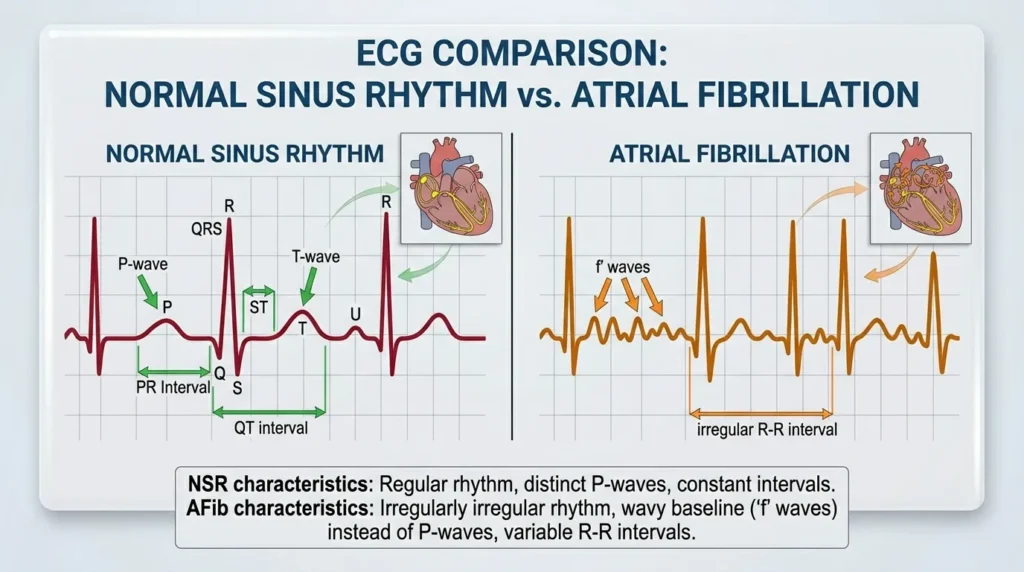
The Apple Watch ECG algorithm uses a validated machine-learning model to classify each 30-second recording into one of six categories. As a healthcare professional, you must understand what each classification means — and more importantly, what it does not mean.
4.1 Sinus Rhythm
This is the result every patient hopes for. The algorithm has determined that the heart rate is between 50 and 100 BPM and that the rhythm is regular with consistent R-to-R intervals. On the Apple Watch ECG PDF, you should be able to verify this yourself: P waves before every QRS, consistent intervals, and a narrow QRS complex. A Sinus Rhythm classification on the Apple Watch ECG PDF does not rule out structural heart disease, ischemia, or conduction abnormalities. It simply means the rhythm during that 30-second window appears normal.
4.2 Atrial Fibrillation
This is the classification the Apple Watch was specifically designed and validated to detect. The algorithm identifies the absence of consistent P waves and irregular R-to-R intervals. On the Apple Watch ECG PDF, you will see a chaotic baseline in place of P waves and irregularly spaced QRS complexes. Importantly, the Apple Watch ECG app for AFib detection has been validated in multiple clinical trials. The Heartline Study, conducted by Johnson & Johnson and Apple, demonstrated that the Apple Watch could detect AFib with high sensitivity in real-world patients.
When a patient presents with an AFib classification on their Apple Watch ECG PDF, your clinical response should include: confirming the finding on a 12-lead ECG; assessing for symptoms (palpitations, dyspnea, chest pain, near-syncope); reviewing the patient’s medication list; and considering anticoagulation status if the finding is new.
4.3 High Heart Rate
This notification appears when the Apple Watch records a heart rate above 100 BPM (tachycardia) during a period when the user has been inactive. On the Apple Watch ECG PDF, you should assess whether the tachycardia is sinus in origin (P waves before every QRS, regular) or something else. Causes range from physiological (dehydration, pain, anxiety) to pathological (sepsis, pulmonary embolism, thyrotoxicosis, supraventricular tachycardia).
4.4 Low Heart Rate
Bradycardia below 40 BPM triggers this classification. On the Apple Watch ECG PDF, look for the rhythm origin: is it sinus bradycardia, junctional rhythm, or a paced rhythm? Bradycardia is not always pathological — highly trained athletes routinely have resting heart rates in the 40s. But symptomatic bradycardia (dizziness, syncope, fatigue) is a clinical red flag that requires a thorough workup.
4.5 Inconclusive
The algorithm could not confidently classify the recording. This happens for several reasons: the heart rate was outside the 50–150 BPM range for classification, there were too many ectopic beats, or the signal quality was borderline. An Inconclusive result on the Apple Watch ECG PDF does not mean the tracing is useless. Review the waveform manually. You may identify clinically relevant findings even when the algorithm declines to classify.
4.6 Poor Recording
Signal quality was insufficient for any analysis. Common causes include: the user not pressing the Digital Crown firmly enough, excessive movement during recording, or dry skin. Advise patients to repeat the recording in a quiet setting, sitting comfortably, with the watch snug on the wrist. From my experience educating patients, this is the most common fixable error.
5. Step-by-Step Guide: How to Read Your Apple Watch ECG PDF
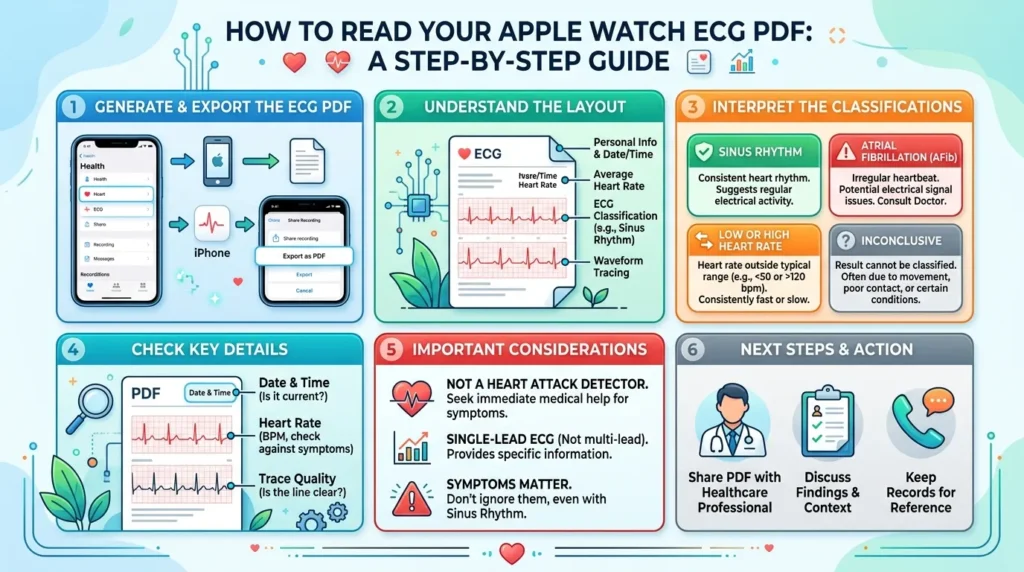
Here is the systematic approach I use when a patient hands me their Apple Watch ECG PDF. Follow these steps every time, in this order. Consistency is the key to not missing findings.
- Check the date, time, and patient context. Was the recording taken during symptoms? This is the single most important contextual question. An Apple Watch ECG PDF showing AFib during asymptomatic rest is clinically different from one taken at the exact moment a patient felt palpitations and nearly fainted.
- Note the heart rate. Is it bradycardic (under 60), normal (60–100), or tachycardic (over 100)? Does this correlate with the patient’s current clinical state and symptoms?
- Read the classification result. Note what Apple’s algorithm has determined. This is your starting point, not your endpoint. Every classification — even Sinus Rhythm — requires manual verification.
- Scan the full 30-second waveform strip for overall rhythm regularity. Is the spacing between QRS complexes regular? Regularly irregular? Irregularly irregular? Irregular rhythm is the hallmark of AFib.
- Identify P waves. Are they present? One before every QRS? Consistent shape and timing? Missing P waves with irregular QRS spacing — think AFib. Absent P waves with regular QRS spacing — think junctional rhythm.
- Measure the PR interval. Prolonged (first-degree block)? Shortened (accessory pathway)? Variable (second-degree block)?
- Assess QRS duration. Narrow (less than 120 ms — supraventricular origin) or wide (greater than 120 ms — bundle branch block or ventricular origin)?
- Evaluate the ST segment. Elevated, depressed, or isoelectric? Even though the Apple Watch is not cleared for ST analysis, obvious ST deviation in a symptomatic patient demands a 12-lead ECG immediately.
- Look at the T waves. Upright, inverted, or peaked? T-wave inversions in a patient with chest pain — even on a single-lead Apple Watch ECG PDF — are a clinical cue to escalate.
- Correlate with the clinical picture. The Apple Watch ECG PDF is a piece of data. Clinical decision-making requires integrating it with history, symptoms, vital signs, and other diagnostic findings.
6. Comparison: Apple Watch ECG vs. Standard 12-Lead ECG
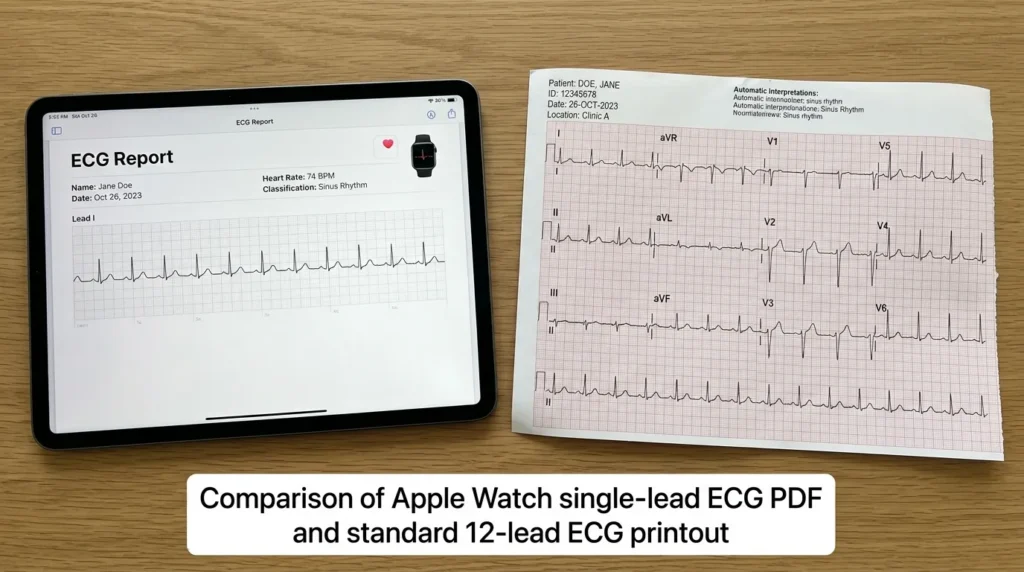
Understanding the capabilities and limitations of the Apple Watch ECG PDF requires direct comparison with the clinical gold standard.
| Feature | Apple Watch ECG | Standard 12-Lead ECG |
|---|---|---|
| Number of Leads | 1 (Lead I) | 12 |
| Recording Duration | 30 seconds | 10 seconds (standard) to continuous (Holter) |
| Location | Anywhere (wearable) | Clinical setting required |
| AFib Detection | FDA-cleared; >97% sensitivity | Gold standard; 12-lead context |
| ST-Segment Analysis | Not FDA-cleared | Full analysis possible |
| Ischemia Localization | Not possible | Yes – territorial distribution |
| P-wave Assessment | Limited (single lead) | Full assessment possible |
| Accessibility | Consumer device; patient-driven | Requires healthcare infrastructure |
| Cost (Device) | Included in Apple Watch ($249–$799+) | Hospital/clinic resource |
| Patient Compliance | High (passive monitoring) | Variable (requires visit) |
| Clinical Verdict | Excellent screening tool; not a standalone diagnostic | Definitive clinical standard |
7. Clinical Insights: What Nurses Know About Wearable ECGs
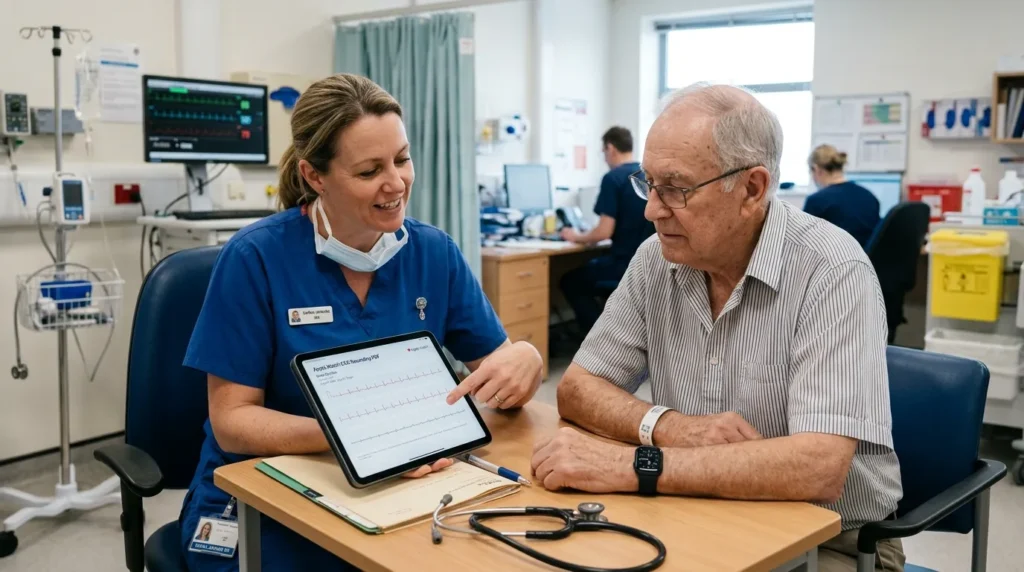
Clinical Pearl #1: Timing Is Everything
In my clinical experience, the most valuable Apple Watch ECG PDFs are the ones taken during symptoms. I always tell patients: if you feel palpitations, start the ECG app immediately. A normal tracing taken 20 minutes after symptoms resolve is far less clinically useful than a 30-second recording captured at the exact moment of the event.
Clinical Pearl #2: The Algorithm Is a Screening Tool, Not a Clinician
The Apple Watch ECG algorithm is excellent at what it was trained to do: detect AFib and flag extreme heart rates. But it was not designed to identify Wolff-Parkinson-White syndrome, second-degree AV block, ventricular tachycardia, or acute MI. When a patient presents with a Sinus Rhythm classification but has symptoms, do not allow the algorithm’s reassuring output to override your clinical judgment.
Clinical Pearl #3: Ectopic Beats Are Common and Often Cause Confusion
Premature atrial contractions (PACs) and premature ventricular contractions (PVCs) are extremely common in the general population. On the Apple Watch ECG PDF, these appear as early beats with altered QRS morphology. Patients often panic when they see these. From my years of nursing, I have learned to educate patients that occasional ectopic beats are rarely dangerous in isolation, but frequent PVCs or couplets in a symptomatic patient warrant further workup.
Clinical Pearl #4: Poor Recordings Are Underreported
Studies suggest that a significant proportion of Apple Watch ECG recordings are classified as ‘Poor Recording’ or ‘Inconclusive’ in real-world use. This is higher in older adults with dry or thin skin, patients with tremors (including Parkinson’s disease), and individuals who are unfamiliar with the proper technique. Coaching patients on correct technique — sitting still, pressing firmly, resting the arm on a flat surface — dramatically improves recording quality.
Clinical Pearl #5: Watch Position Matters
The Apple Watch must be worn on the wrist, not the forearm, and must be snug but not tight. The sensor needs consistent skin contact. I have had patients come in with PDFs showing nothing but noise because they wore the watch incorrectly. Always verify positioning before dismissing a poor-quality recording as a clinical non-event.
Clinical Pearl #6: Do Not Overlook Medication Effects
Drugs like beta blockers, calcium channel blockers, digoxin, and antiarrhythmics can all alter the ECG appearance in ways the Apple Watch algorithm may not flag. A bradycardic tracing in a patient on metoprolol may be expected and therapeutic. A bradycardic tracing in a patient not on any rate-slowing medications is a different conversation entirely.
Clinical Pearl #7: Integration with the Electronic Health Record
Some hospital systems now allow direct import of Apple Health data, including ECG PDFs, into the electronic health record. This is an evolving area in digital health interoperability. Familiarize yourself with your facility’s policy on patient-generated health data so you know how to document Apple Watch ECG findings appropriately in the clinical record.
8. Red Flags and Warning Signs You Should Not Ignore
Not every Apple Watch ECG PDF requires emergency action. But certain findings demand immediate clinical escalation. Here are the warning signs that should raise your clinical antenna:
- AFib classification in a patient with known structural heart disease, valvular disease, or prior stroke requires immediate anticoagulation review and cardiology consultation.
- AFib classification in a patient with a new neurological symptom, such as sudden weakness, speech difficulty, or facial droop — this is a stroke until proven otherwise. Activate your emergency response immediately.
- Wide QRS complex tachycardia on the ECG strip, regardless of the algorithm’s classification — this could represent ventricular tachycardia, which is a life-threatening arrhythmia.
- Visible ST elevation on the Apple Watch ECG PDF in a patient with chest pain, shortness of breath, diaphoresis, or jaw/arm pain — activate your STEMI protocol and get a 12-lead ECG within 10 minutes.
- Extreme bradycardia (heart rate below 40 BPM) with symptoms of poor perfusion: confusion, hypotension, syncope, cold, clammy skin — this patient may need emergency pacing.
- Sudden onset tachycardia above 150 BPM with hemodynamic instability — do not wait for further workup; this patient needs immediate assessment.
- Peaked symmetrical T waves (possible hyperkalemia) in a patient with renal disease, on ACE inhibitors or potassium-sparing diuretics, or with known diabetes — get a stat electrolyte panel.
- Any waveform finding that contradicts the patient’s clinical presentation. Trust your clinical instincts. If the watch says Sinus Rhythm but the patient looks critically ill, the 12-lead ECG and full clinical assessment take precedence.
Home monitoring with an Apple Watch is a powerful supplement to professional care. It is not a substitute. Always remind patients: if you feel severely unwell, call emergency services. Do not stop to record your ECG.
9. Nurse’s Tips for Getting the Best Results from the Apple Watch ECG
For Healthcare Professionals Reading Apple Watch ECG PDFs:
- Always review the waveform strip manually — do not rely solely on the algorithm’s classification label.
- Correlate the PDF with clinical symptoms, history, and vital signs before concluding.
- Ask the patient about the circumstances of the recording: Were you sitting or standing? Were you symptomatic at the time? Did you feel the same symptoms you usually feel?
- If the recording is Poor or Inconclusive but the patient has significant symptoms, proceed to 12-lead ECG without delay.
- Document Apple Watch ECG findings accurately in the clinical record, including the classification result, your manual interpretation, and any discrepancy between the two.
- When educating patients, use plain language: ‘The watch found a possible irregular heartbeat’ rather than ‘you have atrial fibrillation’ — diagnosis requires clinical confirmation.
- Stay updated on Apple’s software changes; algorithm updates can affect classification criteria across Watch OS versions.
For Advising Patients on Optimizing Their Recordings:
- Take ECG recordings while seated, with the arm resting on a flat surface such as a table or thigh.
- Press the Digital Crown firmly and hold for the full 30 seconds without moving.
- Remove any jewelry, watches, or wrist coverings on the same arm during the recording.
- Ensure the watch is worn snugly on the wrist, not the forearm, with the sensor in full contact with the skin.
- Avoid cold environments that cause vasoconstriction and poor skin perfusion, which degrade signal quality.
- Moisturizing hands and wrists can improve conductance in patients with very dry skin, particularly relevant in elderly patients and during dry seasons.
Apple Watches That Support ECG
![Apple Watch Series 11 [GPS 42mm] Smartwatch with Jet Black Alumin...](https://m.media-amazon.com/images/I/41s72HIk5TL._AC_.jpg)
- A FULL-FEATURED HEALTH TRACKER—Apple Watch Series 11 gives you invaluable insights about your body, right from your wris…
- KNOW YOUR SLEEP SCORE—With advanced sleep tracking, Series 11 gives you a daily sleep score. It’s an easy way to help me…
- GET HYPERTENSION NOTIFICATIONS—Did you know that Series 11 can spot signs of chronic high blood pressure? By analyzing h…
![Apple Watch Series 10 [GPS 46mm case] Smartwatch with Jet Black A...](https://m.media-amazon.com/images/I/31Cud2WnszL._AC_.jpg)
- WHY APPLE WATCH SERIES 10 — Bigger display with up to 30 percent more screen area.* A thinner, lighter, and more comfort…
- ADVANCED HEALTH INSIGHTS — Take an ECG anytime.* Get notifications if you have high or low heart rate or an irregular he…
- A POWERFUL FITNESS PARTNER — Measure all the ways you move with Activity Rings, which are customizable to match your lif…
![Apple Watch Ultra 3 [GPS + Cellular 49mm] Running & Multisport Sm...](https://m.media-amazon.com/images/I/51TzswyvNFL._AC_.jpg)
- RUGGED AND READY TO GO—The ultimate sports and adventure smartwatch is built to last with an extremely tough titanium ca…
- A FULL-FEATURED HEALTH TRACKER—Ultra 3 can take an ECG* and check your heart rhythm for signs of AFib—right from your wr…
- ULTIMATE RUNNING AND WORKOUT COMPANION—A superior fitness tracker for marathoners, triathletes, mountain bikers, backcou…
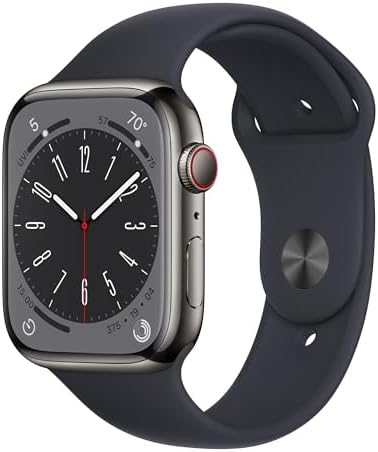
- WHY APPLE WATCH SERIES 8 — Your essential companion for a healthy life is now even more powerful. Advanced sensors provi…
- CELLULAR CONNECTIVITY — Send a text, make a call, and stream music without your iPhone, even while traveling internation…
- EASILY CUSTOMIZABLE — Available in a range of sizes and materials, with dozens of bands to choose from and watch faces w…
![Apple Watch Ultra [GPS + Cellular 49mm] Titanium Case with Midnig...](https://m.media-amazon.com/images/I/41NQgyV24pL._AC_.jpg)
- WHY APPLE WATCH ULTRA – Rugged and capable, built to meet the demands of endurance athletes, outdoor adventurers, and wa…
- EXTREMELY RUGGED, INCREDIBLY CAPABLE – 49mm corrosion-resistant titanium case. Larger Digital Crown and more accessible …
- BIGGEST, BRIGHTEST DISPLAY YET- A bright Always-On Retina display that’s easy to see, even in direct sunlight. More room…
![Apple Watch Ultra 2 [GPS + Cellular, 49mm] - Titanium Case with B...](https://m.media-amazon.com/images/I/41DeJIOU6DL._AC_.jpg)
- WHY APPLE WATCH ULTRA 2 — Rugged, capable, and built to meet the demands of endurance athletes, outdoor adventurers, and…
- CARBON NEUTRAL — Apple Watch Ultra 2 paired with the latest Alpine Loop or Trail Loop is carbon neutral. Learn more abou…
- EXTREMELY RUGGED, INCREDIBLY CAPABLE — 49mm corrosion-resistant titanium case. Large Digital Crown and Customizable Acti…

- Temperature Sensing Technology: Advanced sensors provide temperature insights and support health tracking features.
- Crash Detection: Motion sensors can detect severe car crashes and help connect users with emergency services.
- ECG and Blood Oxygen Monitoring: Supports ECG readings and blood oxygen measurement from the wrist.
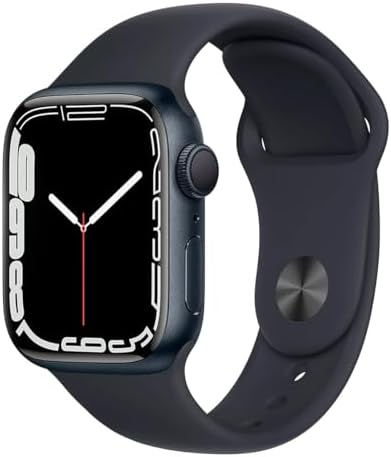
- Larger Always-On Display: Expanded Retina display with thinner borders provides more screen area for apps and notificati…
- Durable Front Crystal: Designed with crack-resistant crystal and improved durability for everyday use.
- Blood Oxygen and ECG Apps: Supports blood oxygen monitoring and ECG readings for health insights.

- LEAVE YOUR PHONE AT HOME: Apple Watch Series 6 GPS + Cellular LTE Model lets you call, text, and get directions without …
- ALWAYS-ON RETINA DISPLAY: You no longer need to raise your wrist or touch the screen to see the time or other informatio…
- ECG ON YOUR WRIST: With the ECG app, Apple Watch Series 6 is capable of generating an ECG similar to a single-lead elect…
![Apple Watch Series 8 [GPS + Cellular, 41mm] - Silver Aluminum Cas...](https://m.media-amazon.com/images/I/31h7lU3cbnL._AC_.jpg)
- Temperature Sensing Technology: Advanced sensors provide temperature insights and support health tracking features.
- Crash Detection: Motion sensors can detect severe car crashes and help connect users with emergency services.
- ECG and Blood Oxygen Monitoring: Supports ECG readings and blood oxygen measurement from the wrist.
![Apple Watch Series 9 [GPS 45mm] Smartwatch with Midnight Aluminum...](https://m.media-amazon.com/images/I/41d-SELeXML._AC_.jpg)
- WHY APPLE WATCH SERIES 9 — Your essential companion for a healthy life is now even more powerful. The S9 chip enables a …
- CARBON NEUTRAL — An aluminum Apple Watch Series 9 paired with the latest Sport Loop is carbon neutral. Learn more about …
- ADVANCED HEALTH FEATURES — Keep an eye on your blood oxygen. Take an ECG anytime. Get notifications if you have an irreg…

- Always-on Retina display has nearly 20% more screen area than Series 6, making everything easier to see and use than eve…
- The most crack-resistant front crystal yet on an Apple Watch, IP6X dust resistance, and swimproof design just to name a …
- Take an ECG anytime, anywhere – Get high and low heart rate, and irregular heart rhythm notifications – Measure your blo…
![Apple Watch Series 9 [GPS 41mm] Smartwatch with Starlight Aluminu...](https://m.media-amazon.com/images/I/41H3T5JY-sL._AC_.jpg)
- WHY APPLE WATCH SERIES 9 — Your essential companion for a healthy life is now even more powerful. The S9 chip enables a …
- CARBON NEUTRAL — An aluminum Apple Watch Series 9 paired with the latest Sport Loop is carbon neutral. Learn more about …
- ADVANCED HEALTH FEATURES — Keep an eye on your blood oxygen. Take an ECG anytime. Get notifications if you have an irreg…

- LEAVE YOUR PHONE AT HOME: Apple Watch Series 6 GPS + Cellular LTE Model lets you call, text, and get directions without …
- ALWAYS-ON RETINA DISPLAY: You no longer need to raise your wrist or touch the screen to see the time or other informatio…
- ECG ON YOUR WRIST: With the ECG app, Apple Watch Series 6 is capable of generating an ECG similar to a single-lead elect…
10. Common Questions My Patients Ask About the Apple Watch ECG PDF
Q1: Can the Apple Watch ECG detect a heart attack?
This is probably the most common question I hear, and the answer requires nuance. The Apple Watch ECG is not FDA-cleared for the detection of myocardial infarction (heart attack). It records a single Lead I equivalent, which gives limited information about the heart’s electrical activity from only one angle. A standard 12-lead ECG is required to identify the territorial ST elevation patterns characteristic of STEMI, or the ST depression and T-wave changes seen in NSTEMI. However, if a patient with chest pain shows obvious ST changes on their Apple Watch ECG PDF, that is a clinical cue to escalate — even if the device itself cannot make the diagnosis. Always get a 12-lead ECG in any patient presenting with chest symptoms, regardless of what the watch says.
Q2: What does ‘Inconclusive’ mean on my Apple Watch ECG PDF?
An ‘Inconclusive’ result means the Apple Watch algorithm was unable to confidently classify the recording into one of its defined rhythm categories. This most commonly occurs when the heart rate is outside the 50–150 BPM detection window for AFib, when there are too many ectopic beats, or when the signal quality is borderline. An Inconclusive result does not mean your heart is fine, and it does not mean something is dangerously wrong. It simply means the algorithm lacked sufficient data. If you receive an Inconclusive classification alongside symptoms, you should seek clinical evaluation. Your healthcare provider can review the waveform manually and perform additional tests if needed.
Q3: Is the Apple Watch ECG accurate enough to use in clinical decisions?
The Apple Watch ECG has been validated in multiple peer-reviewed clinical trials. The Manifest-AF trial and subsequent studies have shown AFib detection sensitivity above 97% and specificity above 99% in validated patient populations. However, these studies were conducted under controlled conditions with specific patient groups. Real-world accuracy may be lower, particularly in patients with multiple comorbidities, concurrent medications, or poor recording technique. As a healthcare professional, treat the Apple Watch ECG PDF as a screening tool: it can raise clinical concern and guide further workup, but it should not be used as a standalone diagnostic instrument.
Q4: Can children use the Apple Watch ECG feature?
Apple’s ECG app is indicated for users aged 22 years and older. In my pediatric nursing experience, I have occasionally encountered adolescent patients who used the feature, but its validation studies did not include pediatric populations. Normal ECG parameters differ significantly in children — heart rate ranges, PR intervals, and QRS durations are all age-dependent. Using adult-calibrated algorithms to interpret pediatric ECGs introduces potential for misclassification. For pediatric cardiac assessment, dedicated pediatric-validated tools and specialist evaluation are the appropriate standard of care.
Q5: My patient has a pacemaker. Can they still use the Apple Watch ECG?
The Apple Watch ECG app does not currently support analysis in patients with pacemakers. Apple explicitly states that the ECG app cannot be used to detect pacemaker function or to analyze paced rhythms. In my clinical experience, paced tracings often show wide QRS complexes and unusual morphology that falls outside the algorithm’s classification parameters, frequently returning an Inconclusive result. Additionally, electromagnetic compatibility between the Apple Watch and implanted cardiac devices should be considered. Patients with pacemakers or ICDs should consult their cardiologist before regularly using the Apple Watch ECG feature.
Q6: How long does an Apple Watch ECG PDF recording last?
Each Apple Watch ECG recording is exactly 30 seconds in duration. The PDF is stored in the Apple Health app on the paired iPhone and can be shared indefinitely. Recordings do not expire, and patients can accumulate a library of PDFs over time. This longitudinal record can be valuable in clinical settings — comparing multiple recordings over days or weeks can reveal patterns, particularly for patients with paroxysmal arrhythmias. Encourage patients to share their ECG history, not just the most recent recording, when attending clinical appointments.
Q7: When should my patient call emergency services instead of recording an ECG?
This is a critical safety question. Patients should call emergency services immediately if they experience: chest pain or pressure lasting more than a few minutes; sudden severe shortness of breath; loss of consciousness or near-fainting with a fall; sudden one-sided weakness, facial drooping, or speech difficulty; or palpitations accompanied by hemodynamic instability (extreme dizziness, near-syncope, or feeling like they are about to pass out). The Apple Watch ECG is a wellness tool. It should never delay emergency care. I always tell my patients: if you feel sick enough to wonder whether you should call an ambulance, call the ambulance first and record the ECG afterwards — if you can.
11. Conclusion
Reading an Apple Watch ECG PDF is a skill that sits at the intersection of traditional clinical cardiology and modern digital health. For nurses, doctors, and allied health professionals, it represents an opportunity to engage with patient-generated data in a meaningful, evidence-based way. The Apple Watch ECG is not infallible, and it is not a replacement for a 12-lead ECG or a cardiologist’s assessment. But when interpreted correctly, it is a powerful clinical ally.
Key takeaways from this walkthrough:
- The Apple Watch ECG PDF contains a heart rate, a rhythm classification, and a 30-second single-lead waveform strip equivalent to Lead I.
- Always verify the algorithm’s classification manually by reviewing the waveform for P waves, QRS morphology, ST segments, and rhythm regularity.
- An AFib classification requires clinical confirmation on a 12-lead ECG and full assessment for stroke risk, symptoms, and anticoagulation status.
- Poor or Inconclusive recordings do not rule out pathology; coach patients on proper technique and proceed with a 12-lead ECG if symptoms are present.
- Never allow a Sinus Rhythm classification on a watch tracing to override clinical judgment in a symptomatic patient.
If this guide has been helpful, share it with a colleague. And if you have questions or clinical experiences to share, leave a comment. I read and respond to all of them. The more we share clinical knowledge around emerging technologies, the better care we deliver together.
Discuss any Apple Watch ECG finding that concerns you with a cardiologist or your attending physician. Patient safety always comes first.
⚠️ Medical Disclaimer: This article is for informational and educational purposes only. It does not constitute medical advice, diagnosis, or treatment. Always consult a qualified healthcare professional for clinical decisions.
References & Citations (APA 7th Edition)
Apple Inc. (2024). ECG app on Apple Watch. https://support.apple.com/en-us/HT208932
Bumgarner, J. M., Lambert, C. T., Hussein, A. A., Cantillon, D. J., Baranowski, B., Wolski, K., … & Chung, M. K. (2018). Smartwatch algorithm for automated detection of atrial fibrillation. Journal of the American College of Cardiology, 71(21), 2381–2388. https://doi.org/10.1016/j.jacc.2018.03.003
Guo, Y., Wang, H., Zhang, H., Liu, T., Liang, Z., Xia, Y., … & Lip, G. Y. H. (2019). Mobile photoplethysmographic technology to detect atrial fibrillation. Journal of the American College of Cardiology, 74(19), 2365–2375. https://doi.org/10.1016/j.jacc.2019.08.019
Isakadze, N., & Martin, S. S. (2020). How useful is the smartwatch ECG? Trends in Cardiovascular Medicine, 30(7), 442–448. https://doi.org/10.1016/j.tcm.2019.10.010
Lubitz, S. A., Faranesh, A. Z., Selvaggi, C., Atlas, S. J., McManus, D. D., Singer, D. E., … & Foulkes, A. S. (2022). Detection of atrial fibrillation in a large population using wearable devices: The Fitbit Heart Study. Circulation, 146(19), 1387–1398. https://doi.org/10.1161/CIRCULATIONAHA.122.060291
Mairesse, G. H., Moran, P., Van Gelder, I. C., Elsner, C., Rosenqvist, M., Mant, J., … & ESC Scientific Document Group. (2017). Screening for atrial fibrillation: A European Heart Rhythm Association (EHRA) consensus document. Europace, 19(10), 1589–1623. https://doi.org/10.1093/europace/eux177
Noseworthy, P. A., Attia, Z. I., Behnken, E. M., Giblon, R. E., Bews, K. A., Liu, S., … & Friedman, P. A. (2022). Artificial intelligence-guided screening for atrial fibrillation using an electrocardiogram during sinus rhythm: A prospective non-randomised interventional trial. The Lancet, 400(10359), 1206–1212. https://doi.org/10.1016/S0140-6736(22)01637-3
Perez, M. V., Mahaffey, K. W., Hedlin, H., Rumsfeld, J. S., Garcia, A., Ferris, T., … & Turakhia, M. P. (2019). Large-scale assessment of a smartwatch to identify atrial fibrillation (Apple Heart Study). New England Journal of Medicine, 381(20), 1909–1917. https://doi.org/10.1056/NEJMoa1901183
Steinhubl, S. R., Waalen, J., Edwards, A. M., Ariniello, L. M., Mehta, R. R., Ebner, G. S., … & Topol, E. J. (2018). Effect of a home-based wearable continuous ECG monitoring patch on detection of undiagnosed atrial fibrillation: The mSToPS randomized clinical trial. JAMA, 320(2), 146–155. https://doi.org/10.1001/jama.2018.8102
Turakhia, M. P., Desai, M., Hedlin, H., Rajmane, A., Talati, N., Ferris, T., … & Bhide, A. (2019). Rationale and design of a large-scale, app-based study to identify cardiac arrhythmias using a smartwatch: The Apple Heart Study. American Heart Journal, 207, 66–75. https://doi.org/10.1016/j.ahj.2018.09.002
U.S. Food and Drug Administration. (2018). De Novo request for Apple Watch Series 4 ECG app. FDA. https://www.fda.gov/medical-devices/electrocardiograph-ecg/apple-watch-ecg
Wasserlauf, J., You, C., Ravi, R., Passman, R., & Arora, R. (2019). Smartwatch performance for the detection and quantification of atrial fibrillation. JACC: Clinical Electrophysiology, 5(5), 571–579. https://doi.org/10.1016/j.jacep.2019.02.003
World Health Organization. (2023). Cardiovascular diseases (CVDs). WHO. https://www.who.int/news-room/fact-sheets/detail/cardiovascular-diseases-(cvds)
Yao, X., Rushlow, D. R., Inselman, J. W., McCoy, R. G., Spaulding, M. L., Larson, N. B., … & Noseworthy, P. A. (2021). Artificial intelligence-enabled electrocardiograms for identification of patients with low ejection fraction. Nature Medicine, 27(5), 815–819. https://doi.org/10.1038/s41591-021-01335-4
Related Articles You May Find Helpful
- Nursing Technology Guide: Smart Devices in Nursing Workflow Without Burnout
- Is Smart Glasses for Nurses: A Complete Beginner’s Guide on How Smart Glasses are Transforming Nursing Care.
- Step-by-Step Guide to Using Smart Watches for Vital Signs Reminders: Nurses Guide 101.
- What Nurses Should Know Before Buying a Smart Watch for Clinical Work: smart watch for nurses in clinical settings
- Apple Watch vs Garmin for Nurses & Doctors: Which Smartwatch Wins This Battle in Hospitals (2026)?
- Best Smartwatches for Nurses in 2026: Features That Actually Matter
- Wearable Blood Pressure Monitors: Do They Work? A Nursing Review (Internal Link)
- Apple Watch Ultra 2 vs Garmin: Which Is Better for Healthcare Professionals? (Internal Link)
- Sleep Apnea in Healthcare Workers: What Nurses Need to Know (Internal Link)
- How to Use the Apple Watch Irregular Rhythm Notification: A Clinical Guide for Nurses
- Wearable Health Technology in the ICU: What the Evidence Says
- AFib Detection with Consumer Devices: A Systematic Review for Healthcare Professionals
- Digital Health Records and Patient-Generated Data: What Nurses Need to Know
| About the Author Abdul-Muumin Wedraogo, BSN, RN Registered General Nurse · Ghana Health Service |
|---|
Abdul-Muumin Wedraogo is a Registered General Nurse currently practicing with the Ghana Health Service with over 10 years of clinical experience across Emergency, Pediatric, ICU, and General Ward settings. He holds a Bachelor of Science in Nursing from Valley View University, Ghana, and trained at Premier Nurses’ Training College, Ghana.
Uniquely among nursing authors, Abdul-Muumin also holds a Diploma in Network Engineering from OpenLabs Ghana and an Advanced Professional Certificate in System Engineering from IPMC Ghana — giving him an exceptional ability to interpret and explain health technology from both a clinical and technical perspective.
He is a licensed member of the Nurses and Midwifery Council (NMC), Ghana, and an active member of the Ghana Registered Nurses and Midwives Association (GRNMA). His writing combines evidence-based clinical knowledge with real-world nursing experience to help healthcare professionals navigate the rapidly evolving landscape of digital health.
— End of Article —
© 2026 Abdul-Muumin Wedraogo, BSN, RN. All rights reserved. For clinical use and educational reference only.